我正在尝试用 1 个路由器连接 4 个网络,我在路由器中创建了 2 个子接口,当我尝试创建第三个子接口时,我得到了这个输出“%Cannot create sub-interface”,这是我的拓扑:https://i.gyazo.com/0d7939a1116e10e3792fe5fd843e35d7.png
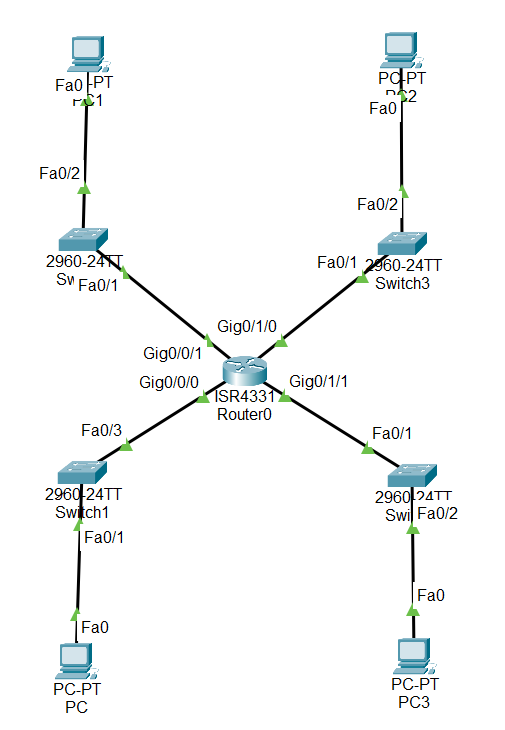
这是我路由器的配置:
hostname Router
!
ip cef
ip ipv6 cef
!
spanning-tree mode pvst
!
interface GigabitEthernet0/0/0
no ip address
duplex auto
speed auto
!
interface GigabitEthernet0/0/0.10
encapsulation dot 1Q 10
ip address 10.1.1.254 255.255.255.0
!
interface GigabitEthernet0/0/1
no ip address
duplex auto
speed auto
!
interface GigabitEthernet0/0/1.20
no ip address
!
interface GigabitEthernet0/0/2
no ip address
duplex auto
speed auto
shutdown
!
interface GigabitEthernet0/1/0
swithport mode access
switchport nonegotiate
!
!
interface GigabitEthernet0/1/1
swithport mode access
switchport nonegotiate
!
!
interface GigabitEthernet0/1/2
swithport mode access
switchport nonegotiate
!
!
interface GigabitEthernet0/1/3
swithport mode access
switchport nonegotiate
!
interface Vlan1
no ip address
!
ip classless
!
ip flow-export version 9
!
line con 0
!
line aux 0
!
line vty 0 4
 login
!
end
我需要创建 4 个网络,每个网络都有一个唯一的 VLAN。并为每个VLAN添加默认网关,使PC相互通信。我知道最好只放置 1 个网络并通过 1 个交换机分隔 VLAN。但我想在路由器中使用比交换机更多的接口。